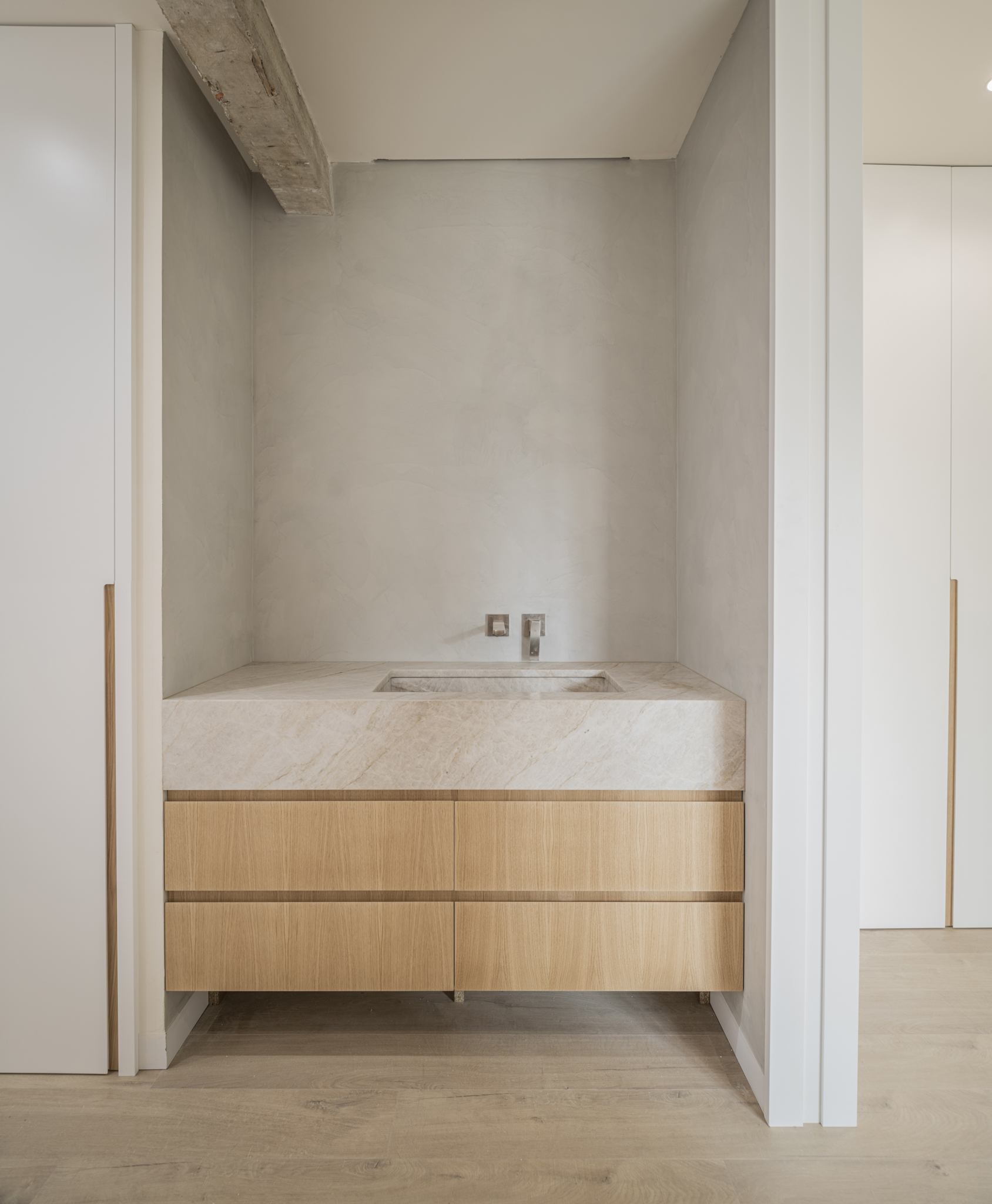
Bespoke bathroom vanity in marble and oak, built from a KitCAD plan
Built · Tra.ma, Madrid
Drawn · sped up 4x
For architects, by architects

Stop redrawing. Start designing.

Parametric AutoCAD blocks and the method behind them. Drop, stretch, done.

Designed in daily practice at Tra.ma, Madrid Featured on Never Too Small
A-01 · The method

Draft faster. Draft better.
Draft once.

KitCAD is a growing catalog of parametric AutoCAD blocks and the methodology that turns hours of redrawing into minutes of precision work. Built by practicing architects with over a decade of professional experience.

The full draw. 2 minutes 25 seconds, real speed, no cuts. Featured on Never Too Small
A-02 · The first draw

Start with three free blocks




Door, Bed, Car. The essentials to try the KitCAD method yourself. No credit card. Just your email.

Door
Bed
Car
A-03 · The catalog

95 blocks. Drawn once, for everyone.

Plans and elevations across doors, furniture, bathroom, kitchen and annotation. Early access: browse everything, buy nothing yet.

Open the block index
A-04 · Pricing

Become a KitCAD architect.

01

Essentials

The core blocks for residential projects. Everything you need to start.

€129 €149
Launch price
  • ~30 parametric blocks
  • Full kitchen set
  • All door types
  • Method basics guide
  • Free updates
03

Max

Everything in Pro plus elevations, MEP, structural, and the automation script.

€399 €449
Launch price
  • ~90 parametric blocks
  • Elevation views
  • MEP + structural blocks
  • LSP automation script
  • Everything in Pro
  • Priority support
Single block
Pick any block from the catalog
€15
Studios & Enterprise
Multi-seat licenses and custom packs
Get in touch
Every purchase includes

Everything you need to start.

.DWG files
Production-ready AutoCAD files in a .ZIP
Install guide
One-page setup in under 5 minutes
Video walkthrough
Step-by-step for every block
Free updates
New blocks added to your pack
Method guide
The KitCAD drafting methodology ebook
A-05 · Built by architects

We use this every day.

KitCAD was born in our own studio. Every block comes from real projects, refined over years of daily use.

R

Riqui

Co-founder, Architect

Practicing architect and founder of Tra.ma. Over a decade of residential and commercial projects in Madrid. KitCAD grew from his drafting workflow.

A

Adri

Co-founder, Architect

Architect specializing in technical documentation and building systems. The precision behind every KitCAD block and the method that ties them together.

Our work has been featured on Never Too Small and published across architecture media.

A-06 · Questions

Frequently asked

How do I receive the files?

After purchase, you receive a .ZIP file containing all your .DWG blocks, the install guide, and the method ebook. Delivery is instant via email and your account dashboard.

Is this different from AutoCAD's built-in AI tools?

Yes. AutoCAD's AI gives you a faster brush. KitCAD gives you the rest of the studio: a complete parametric system with a drafting methodology behind it. The blocks are designed to work together as a coherent kit, not isolated shortcuts.

Why a one-time purchase instead of a subscription?

You already pay Autodesk monthly. We believe your tools should be yours. Buy once, own your .DWG files forever. Updates are included at no extra cost.

Do you offer studio or team pricing?

Yes. For multi-seat licenses or custom block packs, reach out to us directly. We offer volume pricing for studios of all sizes.

What is the refund policy?

Because .DWG files are non-recoverable digital goods, we cannot offer refunds after delivery. That is why we offer the free 3-block pack: try before you commit.

Does the price include VAT?

Prices shown are exclusive of VAT. Applicable tax will be calculated at checkout based on your location, in compliance with EU digital goods regulations.

What does "parametric" actually mean here?

Each block is an AutoCAD dynamic block. Grab a grip and the geometry adapts: stretch a bed to any width, swap a door type, flip a hinge side, all without redrawing a line. The simulator on this page mimics how the real blocks behave inside AutoCAD.

Which AutoCAD versions do the blocks work with?

[PLACEHOLDER: exact supported version range and AutoCAD LT behavior, from Adri.]

Can I adapt the blocks to my office standards?

[PLACEHOLDER: layers, lineweights and annotation standards answer from the team, including what is customizable per tier.]

A-07 · One last line

Stop redrawing. Start with three free blocks.

Door, bed and car, plus the method notes. Launch pricing holds until Sep 1.

Feedback